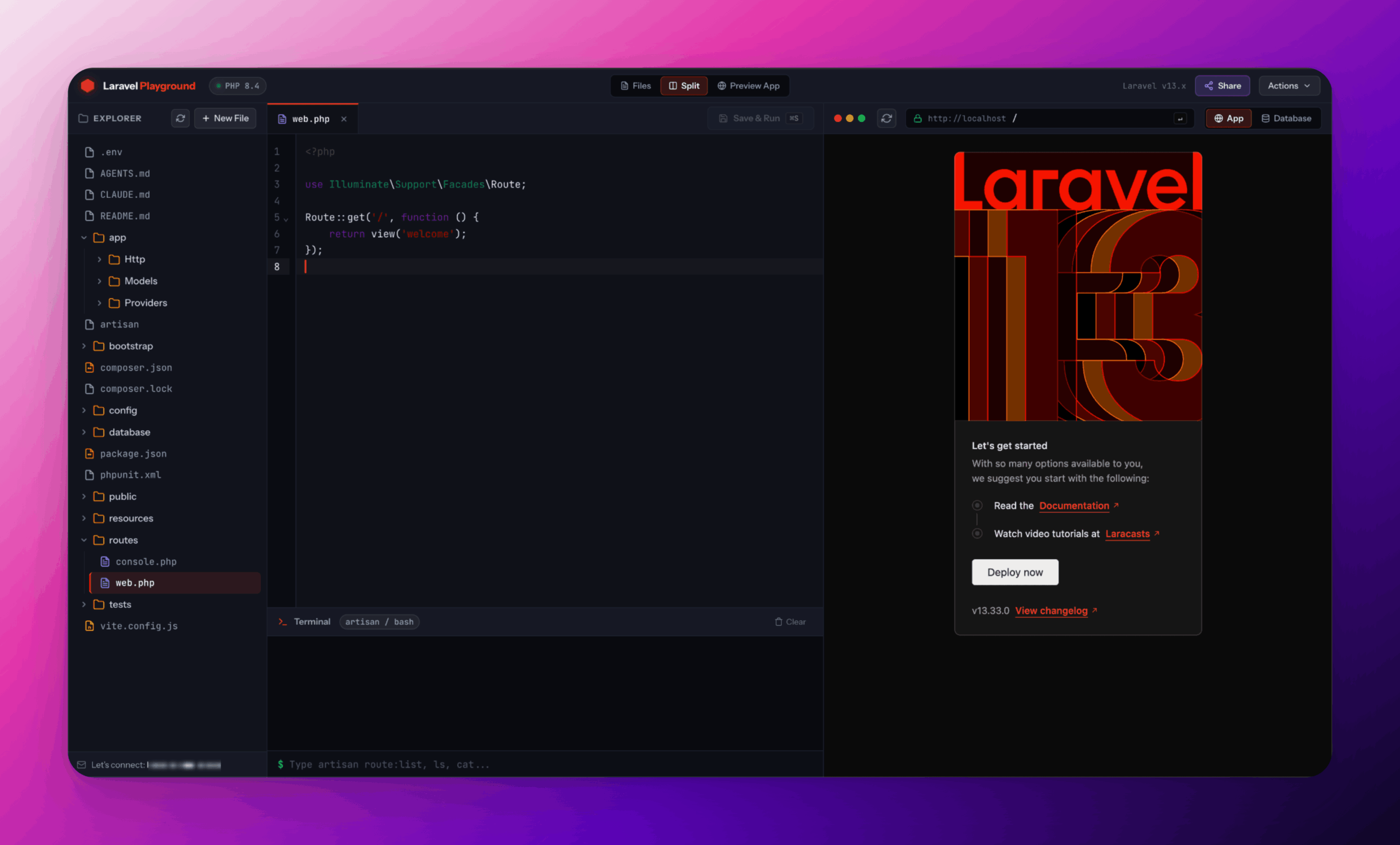
Setting up a Laravel project is easy once your development environment is ready.
The harder part is getting that environment ready in the first place.
For a developer who already has PHP, Composer, a database, and a preferred local setup, this isn’t much of a problem. But when you only want to experiment with an idea, test a Laravel feature, try a Composer package, reproduce a bug, or demonstrate something to another developer, the setup can become the biggest part of the task.
That was the problem I wanted to explore while building PHPPlay.
Try PHPPlay → https://phpplay.dev/
The idea
The goal wasn’t to build another online code editor.
I wanted something closer to a small Laravel development environment that could exist entirely inside a browser.
The experience I was aiming for was:
Open browser
    ↓
Get Laravel workspace
    ↓
Write code
    ↓
Run Artisan
    ↓
Modify database
    ↓
See application
    ↓
Export or share
No Docker container to configure.
No PHP installation.
No Composer installation.
No database server to start.
The key technology that makes this possible is WebAssembly.
Running PHP where the browser is
The architecture is fundamentally different from a conventional Laravel application.
Normally, the browser communicates with a server:
Browser
   ↓
Web Server
   ↓
PHP
   ↓
Laravel
   ↓
Database
PHPPlay moves the execution environment into the browser:
Browser
   │
   ├── PHP compiled to WebAssembly
   │        ↓
   │      Laravel
   │        ↓
   │      SQLite
   │
   └── Playground Interface
The browser therefore isn’t simply displaying an editor. It is hosting the PHP runtime, Laravel application, project filesystem, and database required by the playground.
That changes what an “online Laravel playground” can be.
The workspace is the important part
One architectural decision became particularly important as the project evolved.
The Laravel application used to be bundled directly into the host application. That worked for the initial prototype, but it wasn’t the right mental model for a development environment.
The playground needs to have its own project workspace.
The architecture now looks more like:
Playground
    │
    ├── PHP WebAssembly runtime
    │
    └── Workspace
          ├── app/
          ├── bootstrap/
          ├── config/
          ├── database/
          ├── public/
          ├── resources/
          ├── routes/
          ├── storage/
          ├── vendor/
          ├── composer.json
          └── .env
The initial Laravel project acts as a template.
A workspace is initialized from that template, and the developer works against the workspace rather than modifying the template itself.
This distinction becomes important for features such as resetting a project, importing projects, creating starter templates, and eventually supporting multiple types of PHP projects.
A terminal inside the browser
A code editor alone isn’t enough for Laravel.
A large part of Laravel development happens through Artisan, so the playground needed an actual command-line experience.
PHPPlay provides a terminal where Laravel commands can be executed from the browser:
php artisan migratephp artisan route:listphp artisan db:seedThe terminal also understands common filesystem operations, making the workspace feel much more like a real development environment.
There was an interesting technical constraint here.
A browser-based PHP runtime cannot simply behave like a normal operating-system PHP process. Commands that depend on spawning arbitrary OS processes need a different approach.
Instead of trying to reproduce a complete shell, Laravel and Artisan commands are executed directly through the PHP runtime.
That makes the terminal specifically useful for the Laravel environment rather than pretending that the browser has access to the user’s operating system.
Composer changes the possibilities
Another requirement was package installation.
A Laravel playground becomes much more useful if developers can experiment with packages rather than being restricted to the dependencies that were included in the original project.
PHPPlay therefore integrates Composer/Packagist workflows into the browser environment.
A package can be added to the workspace and its dependencies and autoload information can be updated without requiring a local PHP installation.
This makes the playground useful for package exploration and demonstrations.
For example, instead of telling someone:
Install Laravel
Install the package
Configure the package
Run the example
the experiment can potentially live inside a ready-to-run workspace.
SQLite makes the database portable
For the default playground environment, SQLite is a natural fit.
It doesn’t require a separate database server, and the database can live alongside the project filesystem inside the browser environment.
PHPPlay exposes that database through a visual database interface.
You can inspect tables, browse records, examine schemas, and execute SQL queries.
The result is a useful development loop:
Migration
   ↓
SQLite
   ↓
Database Studio
   ↓
Application
You can also use normal Laravel database workflows through Artisan.
This is particularly useful when learning migrations or building a small proof of concept because the database doesn’t require any additional infrastructure.
The application preview
A development environment also needs to show the result of the code.
PHPPlay includes an application preview alongside the editor.
A route such as:
Route::get('/hello', function () {
    return 'Hello from Laravel';
});
can be saved and executed inside the playground.
The preview handles Laravel-generated output and supports the resources required by typical small Laravel experiments, including Blade views and frontend assets.
The preview is intentionally separated from the host application’s URL.
The application being developed has its own internal routing environment inside the playground rather than navigating the browser away from the playground itself.
That small architectural detail makes the preview behave much more like an embedded development environment.
The editor is only one part of the IDE
The interface has gradually moved beyond being a simple editor.
The current workspace consists of three main areas:
┌──────────────┬──────────────────────┬───────────────                                                     │
│              │                      │                                                                   │
│ File         │ Code Editor          │ Application                                                        │
│ Explorer     │                      │ Preview                                                            │
│              │                      │                                                                    │
│              ├──────────────────────┤                                                                    │
│              │ Terminal             │ Database                                                           │
│              │                      │                                                                    │
└──────────────┴──────────────────────┴───────────────
The workspace can also switch between split mode, full-width code, and full-width application preview.
The goal is to keep the interface useful whether you’re writing code or testing the application.
Saving should feel immediate
One of the smallest features ended up having a big impact on the experience.
Saving the current file immediately updates the running application.
On macOS:
⌘SOn Windows/Linux:
Ctrl+SThe intended workflow becomes:
Change code
    ↓
Save
    ↓
Laravel executes
    ↓
Preview updates
That makes the playground much more suitable for experimentation.
Export is important
A browser playground shouldn’t become a dead-end environment.
If someone builds something useful inside PHPPlay, they should be able to take it with them.
The workspace can therefore be exported as a ZIP, while the SQLite database can also be downloaded separately.
This gives the playground a useful lifecycle:
Create
  ↓
Experiment
  ↓
Build
  ↓
Test
  ↓
Export
The browser is simply the place where the work starts.
Why not just use a traditional cloud IDE?
That’s a fair question.
Cloud development environments are powerful, but they generally provide remote infrastructure: containers, virtual machines, servers, persistent storage, and other backend resources.
PHPPlay is exploring a different model.
For a small Laravel experiment, the entire development environment can potentially be delivered as part of the web application itself.
That makes the experience particularly interesting for:
- Learning Laravel
- Testing ideas
- Trying Composer packages
- Reproducing issues
- Creating examples
- Teaching
- Demonstrating Laravel features
- Building small prototypes
It isn’t intended to replace a complete development environment for a large production application.
It’s meant to reduce the distance between “I want to try something” and “I have something running.”
What makes this interesting beyond Laravel?
The architecture is not fundamentally tied to one Laravel project.
Once you have a browser-based PHP runtime, filesystem, package management, database, terminal, and project workspace, the same foundation can support other PHP-based environments.
One of the directions I’m particularly interested in is Filament.
A future Filament playground could provide a similar experience:
Browser
   ↓
PHP WebAssembly
   ↓
Laravel
   ↓
Filament
   ↓
SQLite
That could make it possible to experiment with Filament panels and packages without first creating a complete local Laravel environment.
There is also room to explore additional PHP frameworks and project types.
What’s next?
There are still several areas I’d like to explore.
Some of the possibilities include:
- Multiple PHP versions
- Multiple Laravel versions
- Laravel starter projects
- Filament playground support
- Importing existing Laravel projects
- Better debugging capabilities
- More advanced project sharing
- Persistent workspaces
- Additional PHP framework support
The interesting part is that many of these aren’t fundamentally UI problems.
They depend on how much of a normal PHP development environment can be reproduced inside a browser.
That is the part of PHPPlay I find most interesting.
Try it
PHPPlay is available at:
If you work with Laravel, try creating something small rather than treating it as a full replacement for your local environment.
Try a migration.
Install a package.
Create a route.
Build a small Blade page.
Run an Artisan command.
Then export the project.
That is the experience PHPPlay is designed around:
open the browser, experiment with Laravel, and get back to building.
PHPPlay is an ongoing project, and I’m continuing to explore what a browser-native PHP development environment can become.